Choosing Reliable IT Support for Your Home or Business
When your computer freezes, your network drops, or a critical system stops working, the quality of the help you get can determine how quickly you are back on track. For many people, the search for dependable IT support starts with a simple question: who can fix this without making things worse? Whether you manage a small office or just want your home network to stay stable, understanding what to look for in a support provider can save time, frustration, and money.
What Does IT Support Actually Cover?
IT support is a broad term. It can mean anything from helping you set up a new printer to managing an entire company's server infrastructure. At its core, it is about keeping technology working so you can focus on your work or daily life. Good support providers offer a range of services that address common problems before they become emergencies.
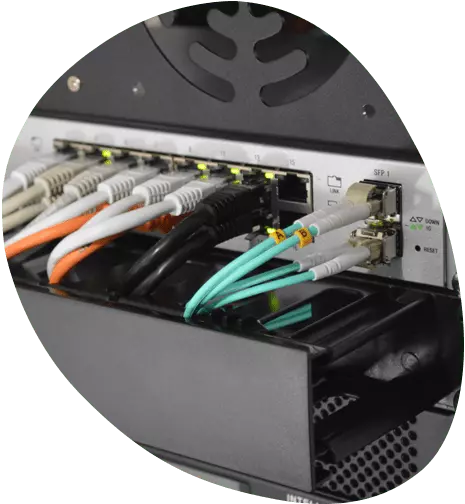
Network issues are among the most frequent reasons people call for help. A slow or unreliable connection can halt productivity, whether you are video conferencing, streaming, or running cloud-based software. Fibre optic connections have become standard in many areas, but they come with their own quirks. Proper support includes diagnosing signal problems, checking router configurations, and ensuring that cabling is not damaged. Similarly, CCTV systems are now common in both homes and businesses. When a camera goes offline or footage is not recording, you need someone who understands the hardware and the software that runs it.
Laptop repair is another area where people often seek help. A cracked screen, a failing battery, or a keyboard that stops responding can make a device unusable. Good IT support includes diagnosing hardware faults and performing repairs with reliable parts. Remote support has also become more important in recent years. Being able to connect to your computer from another location can solve many software problems without a technician needing to visit. Onsite support, however, remains essential for hardware repairs, network cabling, and situations where remote access is not possible.
Managed Support vs. Break-Fix: Which Is Right for You?
One of the first decisions you face is whether to pay for ongoing managed support or to call for help only when something breaks. Both approaches have their place, and the right choice depends on your situation.
Break-fix support is straightforward: you have a problem, you call someone, they fix it, and you pay for that visit. This can work well if you rarely have issues and have some technical knowledge yourself. The downside is that you are paying a premium for emergency service, and you may wait longer for help during busy periods. There is also no proactive maintenance, so small issues can grow into bigger, more expensive ones over time.

Managed support involves a monthly or annual fee for ongoing monitoring, maintenance, and priority access to technicians. For businesses, this often makes more sense. A managed provider can spot a failing hard drive before it crashes, update software to close security holes, and ensure backups are running properly. For residential users, managed support might be overkill unless you run a home office or have complex equipment. Some providers offer hybrid plans, where you get basic monitoring and discounted rates for additional work.
Key Services to Expect from a Competent Provider
Not all IT support companies offer the same services. When evaluating a provider, look for these core capabilities:
- Network setup and troubleshooting: This includes configuring routers, switches, and Wi-Fi access points, as well as diagnosing slow speeds and dropouts.
- Fibre optic and cabling work: Fibre connections require careful handling. A good provider can test signal strength, repair damaged cables, and install new runs cleanly.
- CCTV installation and support: From setting up cameras to configuring recording software and remote viewing, this is a specialised skill that many general IT companies also offer.
- Remote and onsite support: Remote access allows quick fixes for software issues. Onsite support is necessary for hardware repairs, cabling, and complex network changes.
- Laptop and desktop repair: Screen replacements, keyboard repairs, battery swaps, and data recovery are common requests. A provider should be transparent about parts used and turnaround times.
These services cover the most common needs for both homes and small to medium businesses. A provider that offers all of them under one roof can simplify your life, as you do not need to coordinate between different specialists.
How to Assess the Quality of IT Support
Finding a good IT support provider is not just about what services they list on their website. The real test is how they handle problems when they arise. Here are some practical things to consider:
Response time matters more than you think. A provider who promises 24/7 support but takes hours to return a call during an outage is not delivering value. Ask about their typical response times for different severity levels. For a business, a four-hour response might be acceptable for a non-critical issue, but a server failure should trigger a much faster response.
Communication should be clear. Good technicians explain what went wrong and what they did to fix it in plain language. If a provider uses jargon to sound impressive or avoids explaining their work, that is a red flag. You want someone who treats you as a partner in keeping your systems running, not as a passive customer.
Heev IT is also on YouTube.
They should have experience with your specific setup. If you run a network with multiple VLANs and a fibre backbone, a generalist who mostly handles home Wi-Fi may struggle. Conversely, a large enterprise-focused provider may not want to take on a small business or residential client. Look for a provider whose typical clients match your profile.
Pricing should be transparent. Avoid providers who give vague estimates or add surprise fees for travel, diagnostics, or parts. A reputable company will give you a clear quote before starting work and will ask for approval before any additional charges. This is especially important for onsite visits, where travel time and call-out fees can add up quickly.
For many people in Cape Town and the surrounding areas, Heev It support has become a practical choice because it covers a wide range of needs without forcing customers into one-size-fits-all contracts. Whether you need a one-time repair or ongoing managed support, the key is finding a team that listens to your specific situation and responds accordingly.
Common Mistakes People Make When Choosing IT Support
Even experienced business owners sometimes make errors when selecting a support provider. Being aware of these pitfalls can help you avoid them:
- Choosing based on price alone. The cheapest option often cuts corners on parts quality, response times, or technician training. A slightly higher upfront cost can save you money in the long run if it means faster repairs and fewer repeat visits.
- Ignoring security basics. Some providers focus only on fixing immediate problems and neglect security updates, firewall configurations, and backup verification. Make sure your provider includes these in their standard offering.
- Not checking for local availability. A provider based far away may charge high travel fees or take longer to arrive for onsite work. Local providers understand regional infrastructure and can respond more quickly.
- Assuming all technicians are equally skilled. Ask about the experience level of the person who will actually work on your system. A company may have a great reputation, but if they send a junior technician for a complex job, the result may be disappointing.
- Failing to ask about backup and recovery. Many people only think about backups after data is lost. A good provider will help you set up a reliable backup strategy and test it regularly.
By avoiding these mistakes, you can find a support partner who adds real value rather than just another expense.
Making the Most of Your IT Support Relationship
Once you have chosen a provider, there are steps you can take to get the best results. Keep a log of recurring issues, even small ones. This helps the technician spot patterns that might point to a deeper problem. Be clear about your priorities: if a slow internet connection is hurting your business, say so. If you need a laptop repaired urgently because you travel soon, mention that upfront.

It also helps to have basic documentation ready. Know your internet service provider, your router model, and any software licenses you use. This information saves time during troubleshooting and helps the technician understand your environment faster.
Finally, treat the relationship as a partnership. Good IT support is not just about fixing things when they break; it is about preventing problems and helping you make better technology decisions. A provider who understands your goals can recommend upgrades, security improvements, and workflows that genuinely improve your daily experience.
Heev IT, based in Cape Town, Western Cape, provides residential and business IT support including network, fibre optic, CCTV, remote, onsite, managed support, and laptop repair services. You can reach them at +27 21 879 3044 for a consultation tailored to your needs.